






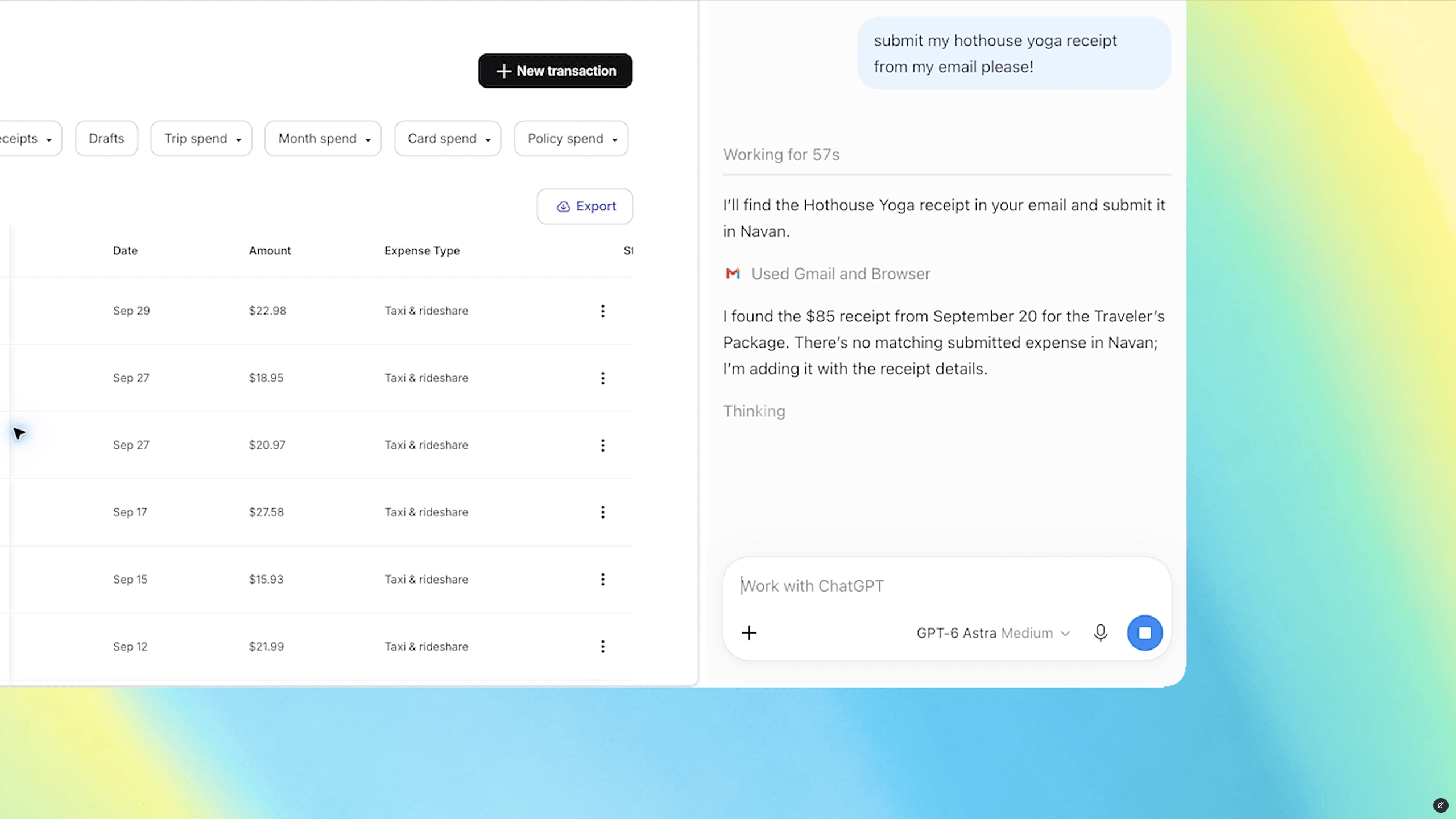
ChatGPT’s Chrome extension can now look across the tabs you already have open — and in its work mode, act on them. For anyone who manages several clients from one browser window, that is not a convenience feature. It is a question about which client’s data just became visible alongside which other client’s data.
“OpenAI’s ChatGPT Atlas browser is gone, but now ChatGPT’s Google Chrome extension is getting some upgrades that allow it to use the browser tabs you already have open. With the extension installed, OpenAI says ChatGPT can now view your browser tabs when you tag Chrome in ChatGPT’s web or desktop app.”
Our take
There are two modes and the difference between them is the whole story. Per PPC Land’s reporting on the October 15 announcement, OpenAI says that in Chat mode “it can look across your open tabs and gather info” — read-only. In Work mode, “ChatGPT can control your Chrome tabs to get things, like sending messages, filling out forms, or downloading files,” and it can group tabs too. The listed example tasks are the mundane ones: comparing pricing pages, filling registration forms, adding vendors to a spreadsheet, drafting emails from what is on screen.
Read plus act is a different risk category than read alone. And the input it reads is the open web, which nobody controls. That combination — untrusted content in, real actions out — is precisely where prompt injection stops being a research curiosity and becomes a Tuesday afternoon problem. PPC Land notes that OpenAI has not published prompt-injection defenses or testing results for this, in contrast to Anthropic’s Claude for Chrome. That gap is the most important line in the coverage, and it got almost no attention.
The second detail worth dwelling on: one of OpenAI’s own sample prompts asks ChatGPT to fill a form and “stop before submitting.” The stop is something the user has to write into the request. PPC Land says it is not stated whether the product pauses on its own. A safeguard that depends on the operator remembering to ask for it is not a safeguard — it is a habit, and habits fail on busy days. This is the same point Microsoft’s CEO made about putting controls outside the model rather than trusting the model to hold the line, and it shows up here as a concrete product gap.
Now apply this to how an agency actually works. At two in the afternoon, a typical operator has open: one client’s ad account, a second client’s CRM, a shared inbox, a password manager vault, an invoice, and their own bank tab. Those represent different companies, different confidentiality obligations, and in some cases different regulated categories. A tool that reads “across your open tabs” collapses all of that into one context. Nothing has to go wrong for that to be a problem — if your client agreement says their data stays with named processors, routing it through an assistant nobody listed is already a breach of the agreement.
Access scope is also murkier than it should be. PPC Land points out that OpenAI’s thread says “Available for all ChatGPT plans” but places that line under the download link, so it may describe only the extension rather than Work’s tab control — and Work launched in July for paid tiers. Neither source describes what permissions the extension requests or whether there is a consent step before it acts. When the documentation is ambiguous about who gets the powerful mode and what it asks permission for, the safe assumption is the broad one.
There is a distribution story here too, and it explains why this will land on machines nobody vetted. OpenAI launched the Atlas browser in October 2025, discontinued it in July 2026, and folded its browsing functions into ChatGPT Work inside a unified desktop app. A browser requires someone to choose to install a browser. An extension update to Chrome requires nothing. The capability that failed to win adoption as a product arrives this time as a feature of software your team already runs — which is smart for OpenAI and inconvenient for whoever at your company is supposed to approve tools.
The fix is unglamorous and free: separate profiles. Run a dedicated Chrome profile for AI-assisted work containing only the tabs that work needs, and keep client admin consoles, finance, and credential managers in a profile the extension is not installed in. Browser profile isolation is the containment boundary that actually matches how this tool reads data, and it takes about ten minutes to set up. Everything else — policy documents, training, reminders to be careful — depends on people being careful while under deadline, which is not a plan.
What this means for your business
- Create a separate Chrome profile for AI-assisted work today. Install the extension there only. Keep client admin panels, banking, and your password manager in a profile where it is not installed.
- Stay in Chat mode unless a task genuinely needs actions taken. Reading across tabs is risky; sending messages and submitting forms is a different order of risk. Make Work mode a deliberate choice, not the default you left on.
- Check your client agreements for named-processor or sub-processor language. If a contract or DPA lists who may handle client data, a tab-reading assistant is a new processor. Get it listed or keep it away from that client’s tabs.
- Set a browser extension policy for your team and enforce it with managed Chrome. A written rule that anyone can ignore with two clicks is not a control. Allowlist extensions at the admin level.
- Never run a tab-reading assistant in the same profile as a live payment or ad-spend console. Form filling plus budget fields plus untrusted page content is a combination worth refusing outright.
Can ChatGPT see my tabs without me asking?
Reported behavior is that it reads tabs when you tag Chrome in a request. The coverage does not describe the permissions requested or any consent step, so treat the installed extension as having broad potential access.
Will it submit a form on its own?
Work mode can fill forms and send messages. OpenAI’s own sample prompt instructs it to stop before submitting, which suggests the pause is something you request rather than a built-in default.
The full feature list and OpenAI’s own framing are in the original report: ChatGPT can peek at your Chrome tabs now, by Stevie Bonifield for The Verge.
Should you let ChatGPT read your Chrome tabs at work?
MCNM’s take: We manage client WordPress sites, Google Ads, and social media, the kind of work where one browser can hold several clients’ data at once. Our rule is that AI can draft, but a person reviews and approves before anything publishes or sends. A tool that can fill forms and send messages from your tabs can cross that line, so our advice is to keep it away from any browser that holds a client login.
Pros
- It can save time on routine tasks, like comparing pricing pages, filling registration forms, or adding vendors to a spreadsheet.
- Chat mode only reads, so you can try it on low-risk research before you trust it with anything more.
- It runs inside the Chrome browser you already use, so there is no new browser to install or learn.
Cons
- It can look across your open tabs, mixing one client’s data with another’s. That can break contracts that name who may handle client data.
- Reporting says OpenAI has not published prompt-injection defenses or test results, and any page you open could try to steer it.
- In Work mode, the pause before a form submits appears to be something you must ask for. Busy people forget.
Our recommendation: A solo owner doing general research in a clean browser profile can try Chat mode with little risk. Anyone with client logins, payment tools, or ad budgets open should keep it out of that browser and leave Work mode off. This week, pick one low-risk research task, run it in a separate profile, and decide if the time saved is worth it.
Your turn: How many different clients’ systems are open in your browser right now? Tell us in the comments below.
Put AI to Work for Your Business
MCNM Marketing — the team behind this publication — helps businesses across Las Vegas, Southern California, and Northern Arizona turn stories like this into revenue with AI marketing solutions, SEO & digital strategy, and marketing automation. A+ BBB rated.
Discover more from Digital Media Marketing, and Technology News
Subscribe to get the latest posts sent to your email.


